Construction Dispatch Management Software

Construction Dispatch Management Software
Schedulers at small trades firms can spend 30–60 minutes each morning copying rows from Google Sheets into group texts just to dispatch crews. Construction dispatch management software is a category of tools that centralizes daily crew assignments and sends SMS notifications without requiring field-worker logins. Our CrewSheet offers a drag-and-drop day board and push-based SMS so an operator can build the board and notify every worker in about 30 seconds. This article evaluates construction dispatch management software and compares SMS-first dispatch versus full crew-scheduling suites, weighing PTO awareness, single-use rules, and the costs of staying on spreadsheets. See our CrewSheet features and a crew scheduling apps comparison to learn which trade-offs matter most.
What core principles should you require from construction dispatch management software?
Require speed, flexibility, single-use enforcement, visible PTO, and no-login one-way communications. These five principles cut operator hours, stop double-bookings, and keep field crews following simple instructions while you retain spreadsheet-like flexibility.
What is construction dispatch management software? 🏗️
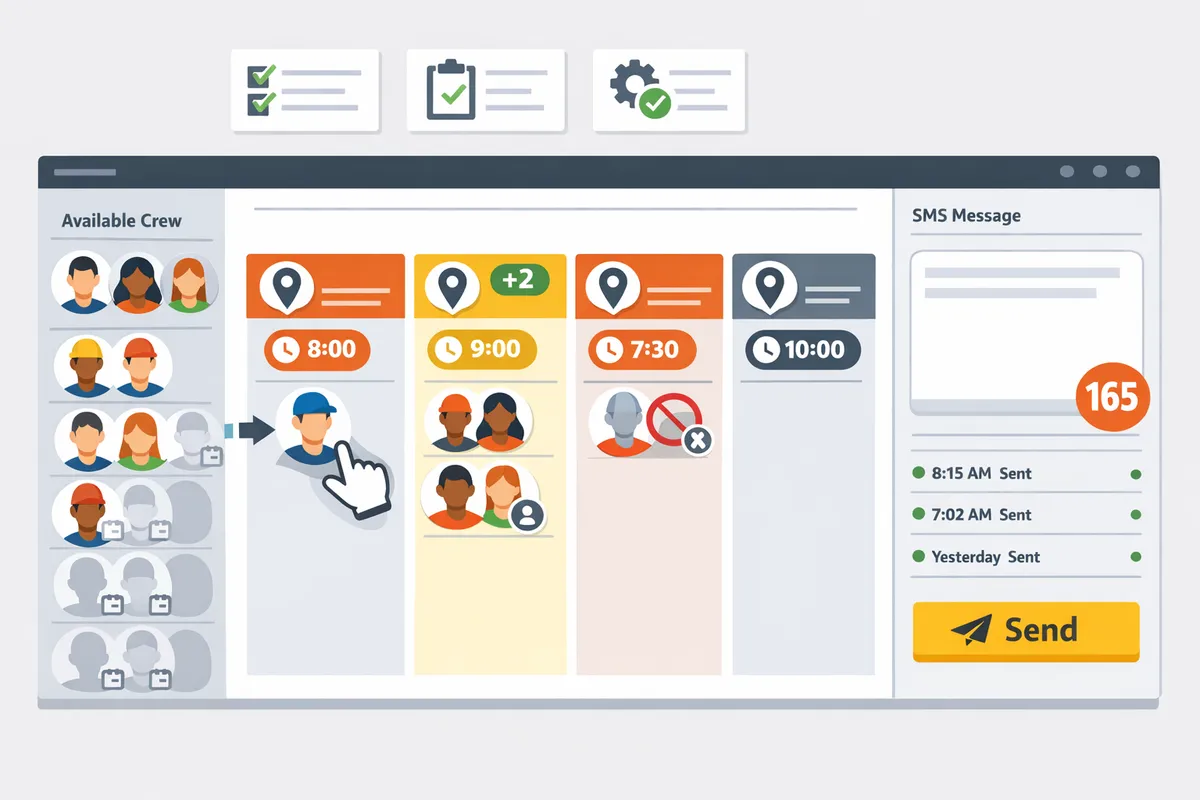
Construction dispatch management software is a category that centralizes daily crew assignment and outbound job notifications for rotating-job trades. It focuses on the scheduling-to-notify loop rather than full project accounting. For example, tools built for coatings or HVAC prioritize "who's on which job tomorrow" and fast SMS delivery over time sheets and deep ERP workflows. CrewSheet exemplifies this approach with a day-board that keeps jobs side-by-side, a pool of unassigned crew, and one-click schedule sends that map to the operator's existing job list. For the broader buyer checklist and comparisons, see our construction dispatch software guide.
Why a fast send matters ⏱️
A fast send minimizes schedule lag and reduces reactive calls to the office. Schedulers at small trades firms often spend 30–60 minutes each morning copying rows from Google Sheets into group texts; slower workflows multiply that waste when jobs change late. Faster sends keep the day's plan current and reduce the temptation to build fragile, copy-paste message scripts. CrewSheet addresses this by letting an operator drag names onto the board, pick a template, and send SMS without retyping job details. In practice, that means fewer correction calls from foremen and more time for invoice prep or procurement.
Why no-logins and one-way SMS reduce friction 📲
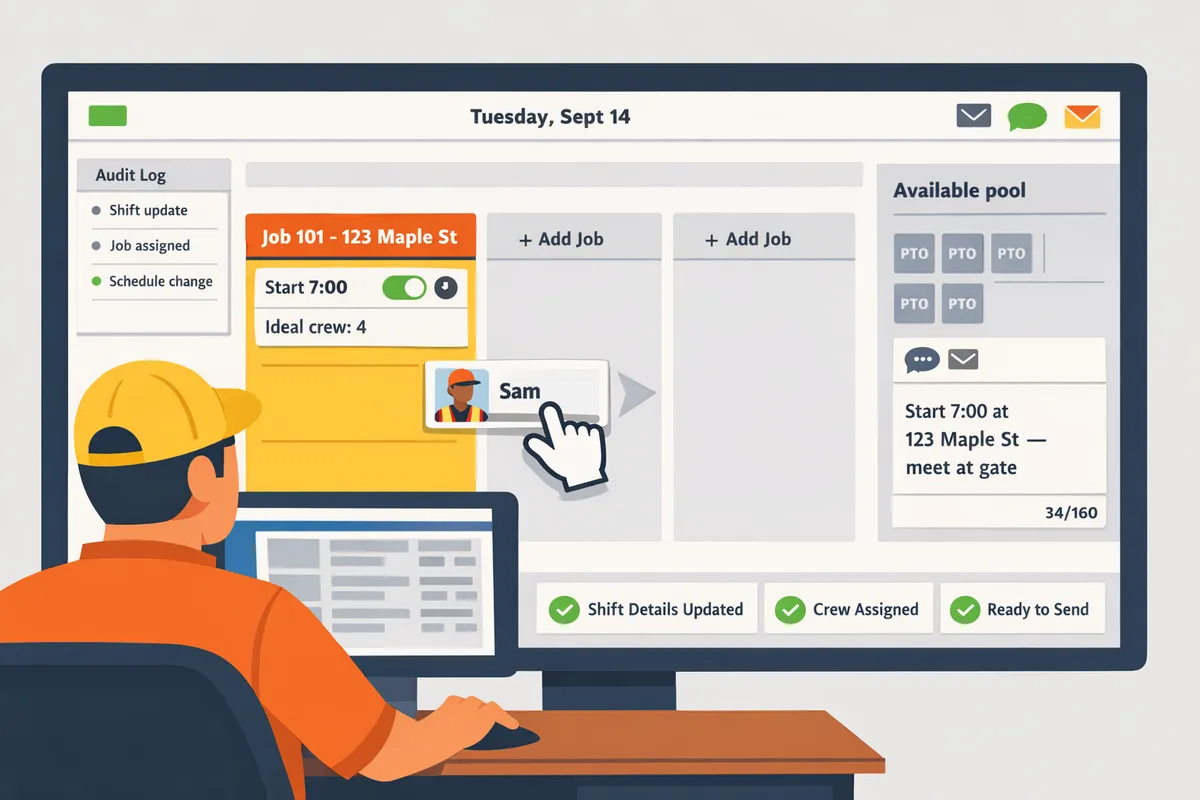
No-login, one-way SMS removes onboarding friction and reduces app fatigue for field crews. Most trades crews work offline on site and resist installing new apps or remembering extra passwords; requiring accounts creates adoption friction and support tickets. CrewSheet sends outbound SMS and email to phone numbers on file, so field members never create accounts or install software. The one-way model matches how crews already operate: receive clear start time and location, then execute. Tip: keep schedule texts concise (job name, address, start time) to lower confusion and carrier segmenting costs. See our no-login crew scheduling solution for more implementation notes.
💡 Tip: Use a short template for morning sends (job, start time, meeting point). Short messages reduce misreads and lower SMS segments.
Single-use enforcement and visible PTO prevent double-bookings ⚠️
Single-use enforcement is a scheduling rule that blocks assigning the same person to more than one job on the same day. Showing PTO in the available pool is a visibility control that prevents scheduling someone on their day off. Together they stop the most common operator errors: accidental double-bookings and texting people who are unavailable. For example, a single double-booked day for a 12-person coatings crew can cost two lost billable crew-days and emergency overtime for the operator. CrewSheet implements this by graying out PTO entries in the pool and blocking clashes when an operator attempts a conflicting drag. Warning: keeping PTO in a separate spreadsheet invites mistakes; surface PTO on the day-board.
Require flexible assignment, not rigid crew sizes 🛠️
Flexible assignment lets operators overstaff when needed and treat foremen as regular draggable resources. Rigid systems that enforce exact crew sizes force workarounds or leave operators unable to respond when a foreman brings extra labor to a job. CrewSheet shows an "ideal crew size" but allows overstaffing and makes supervisors behave like any other resource. That flexibility reduces time spent undoing system-enforced rules and prevents the business cost of refusing extra billable hours. For guidance on selecting tools that match this workflow, compare options in our scheduling software for construction crews overview.
Which proven strategies reduce scheduling errors and improve crew communication?
Use a day-board workflow, template-driven SMS with live character counters and built-in 10DLC, an objective vendor-scoring rubric, and permissive overstaffing to cut double-bookings and missed starts. These four practices each address a specific failure point: speed, message fragility, biased buying decisions, and real-world crew variability. Run them as a focused two-week pilot to measure reduced scheduling time and fewer crew-side errors.
Day-board workflow: build a day's schedule in minutes 🗂️
A day-board arranges full-day jobs side-by-side so operators assign crews by drag-and-drop, which reduces schedule creation and editing time. This layout matches most trades where only the start time matters and avoids hour-by-hour over-complication. Implement in a pilot by importing one week of jobs, using a single-day view to assign crews, and using copy-between-dates to reproduce repeat assignments. Track three metrics: minutes to build the morning board, number of double-bookings prevented, and scheduling edits after field calls. CrewSheet's single-day board supports drag-and-drop, copy-between-dates, and PTO-aware pools, letting you test the workflow without rebuilding your entire process.
💡 Tip: Make PTO visible in the pool and mark unavailable crew as grayed-out to prevent accidental assignments.
Link to our practical overview on day-board scheduling in the crew scheduling guide: Crew Scheduling Software for Construction Trades.
Message templates, character counters, and 10DLC compliance ✉️
Pre-formed SMS templates with a live character-and-segment counter and A2P 10DLC registration prevent broken scripts and carrier filtering. Tie templates to job fields (address, start time, foreman name) so operators edit less and send consistent messages. Pilot steps: create 3 common templates, run 50 test sends, monitor the live segment counter for multipart messages, and review delivery statuses for carrier filtering. CrewSheet provides dropdown templates with a live segment counter and includes 10DLC handling so you can test messaging reliability without guessing carrier rules.
💡 Tip: Always use double opt-in for SMS signups to improve deliverability and reduce spam complaints.
See the dispatch messaging best practices in our construction dispatch primer: Construction Dispatch Software.
Scoring rubric and vendor comparison matrix (table) 📊
A simple scoring rubric turns subjective vendor pitches into objective buying choices by scoring setup time, login requirement, SMS compliance, day-board UX, and total cost of ownership. Use a 1–5 scale (1 = poor/slow/high cost, 5 = excellent/fast/low cost) and weight items based on your priorities (example weight: setup 25%, login friction 20%, SMS 25%, UX 20%, TCO 10%). Below is a pragmatic shortlist you can use as a starting point for a procurement pilot.
| Vendor | Setup time (1-5) | Field-worker login requirement | SMS compliance | Day-board UX (1-5) | Total cost of ownership (1-5) |
|---|---|---|---|---|---|
| CrewSheet | 5 | No logins for field crew | Built-in 10DLC / A2P | 5 | 4 |
| Assignar | 2 | Requires per-worker logins | 3 (third-party SMS) | 3 | 2 |
| Spreadsheet + SMS | 3 | No logins but manual | 1 (high carrier risk) | 1 | 5 |
Use this table in your pilot to score real onboarding time, number of manual steps, and message delivery issues. Assign weights and compute a composite score after one week of hands-on testing. For vendor context and broader comparisons, see our 2026 market shortlist: Crew Scheduling Apps: Best for Construction 2026.
Allow overstaffing: schedule for real-world trade variability 👷
Permissive overstaffing reduces lost hours when jobs suddenly need backup or a critical trade is short-handed by letting operators add buffer labor without blocking scheduling. Treat the "ideal crew size" as guidance, not a hard rule; show the ideal on the job card but allow extra assignments with a one-click override. Pilot this by allowing an extra resource on 20–30% of jobs for two weeks and track incidents where the extra hand prevented a missed start or avoided overtime. CrewSheet displays ideal crew size while allowing overstaffing and single-use enforcement, so you can measure the trade-off between buffer labor cost and avoided downtime.
Link for operators choosing the no-login approach and testing crew-side behavior: No-Login Crew Scheduling Solution for Construction Field.
How do you implement construction dispatch management software and measure success?
A staged pilot with CSV migration, operator playbooks, and a tight metric set proves value while keeping downtime minimal. Running a short pilot on live jobs shows time saved and scheduling errors avoided, which builds the data-driven case for purchase.
Pilot plan: run a two-week pilot with real jobs 🧪
Run a focused 2–4 week pilot using real jobs and live SMS sends to validate time savings and error reduction. Pilot plan is a short-term validation process that uses your day-to-day operations to produce measurable results. Use CrewSheet to import a single week of jobs and crew, build the day-board each morning, and send messages to a subset of crews so the pilot affects real work without disrupting all crews.
- Select scope. Pick 3–5 recurring jobs and 8–12 crew members for the first pilot group.
- Import data. Drop job and crew CSVs into CrewSheet and confirm smart column mapping.
- Run the workflow. Each morning: build the board, pick a template, and send SMS to the pilot crews.
- Track outcomes. Record time-to-send, any scheduling corrections, and missed starts.
- Debrief. Hold a short end-of-day standup with the operator and one foreman to capture friction points.
Example: measure operator minutes saved per day and multiply by hourly cost to estimate two-week payback for decision-makers. For background on why a day-board approach matters, see our Construction Dispatch Software guide.
Migration checklist: CSV import, PTO sync, and roster cleanup 📋
Follow a short, ordered migration checklist to prevent mismatched phone formats, missing PTO, and duplicate entries. A migration checklist is a procedural list that prevents common data errors during the first week of live use and makes rollback simple if you need it.
- Standardize phone numbers. Normalize to a single format (for example +1##########) and remove non-digit characters.
- Clean roster. Remove duplicate names, confirm roles (crew, foreman), and add missing emails only if you plan to use email sends.
- Export and keep a rollback copy. Save the original spreadsheet version before any import for quick recovery.
- Import jobs with smart column matching. Use CrewSheet's auto-detect to map job number, address, start time, and ideal crew size.
- Mark PTO before first send. Enter known PTO so the pool shows unavailable crew on the selected date.
- Run a dry-day. Build a board and perform a mock send to the audit log without contacting all field crew.
⚠️ Warning: Carrier limits and message compliance matter. Confirm campaign settings and templates before sending large batches to avoid delivery delays.
For a fuller checklist of setup steps and role mapping, review our Scheduling Software for Construction Crews guide.
Success metrics: send time, conflicts avoided, and operator hours saved 📈
Measure average send time, daily scheduling conflicts avoided, and weekly operator hours saved during the pilot. These three metrics directly translate into scheduler cost savings and fewer missed billable hours. Use CrewSheet's audit log to capture send timestamps and a simple tracking sheet to tally conflict corrections and operator time spent.
- Average send time. Track the operator's active minutes from "board ready" to "send". Compare to the current spreadsheet workflow to compute minutes saved per day.
- Conflicts avoided. Count double-bookings or PTO scheduling corrections caught by single-use enforcement and PTO visibility. Each avoided conflict prevents lost crew-hours and emergency rework.
- Operator hours saved. Subtract pilot-week scheduler hours from baseline scheduler hours to get weekly hours saved. Multiply by hourly burden to calculate weekly dollar savings.
Use a short payback formula: (weekly hours saved × fully loaded scheduler rate) × 52 minus annual subscription cost gives annual net benefit. Store all raw data from the pilot so finance can replicate the math. If you need a comparison on one-way SMS sends versus multi-login platforms, see our No-Login Crew Scheduling Solution for Construction Field.
Change management: operator playbooks and foreman filtered views 🛠️
Train operators with a one-page playbook and give foremen a filtered view so the workflow stays fast and consistent. Operator playbook is a concise procedural guide that lists the exact steps an operator follows each morning to keep sends under a minute and avoid mistakes.
- Create a one-page cheat sheet with 5 steps: open date, confirm PTO, build board (drag names), pick template, send and log.
- Record a 15-minute demo showing the day-board and message template workflow and store it with the cheat sheet.
- Run a 30-minute live training for schedulers and a 10-minute walkthrough for foremen.
- Assign a backup operator and script a one-line escalation path for last-minute changes.
Give foremen access to CrewSheet's supervisor-filtered view labeled "who's on my job tomorrow" so they stop calling the office for roll calls. Short, repeatable procedures plus the foreman view reduce phone traffic and preserve the "drag names, hit send" rhythm.
Frequently Asked Questions
This FAQ collects concise buying and implementation answers operators use when evaluating construction dispatch management software. Each answer focuses on the needs of small-to-midsize trades and includes checks you can run during a pilot.
How does construction dispatch management software for small business differ from enterprise platforms? 🧰
Small-business tools prioritize speed, low setup friction, and no-login crew communications over deep ERP features and mandatory field logins. Enterprise platforms often require company-wide user provisioning, multi-week onboarding, and strict role enforcement that increases cost and reduces flexibility. For a 10–30 person trades crew, that extra overhead costs admin hours and slows adoption; our CrewSheet focuses on a day-board workflow and push-based SMS so operators can prove value with a short pilot and minimal change management. See our no-login crew scheduling solution for the trade-offs between fast adoption and full-featured platforms.
Can I send field crew dispatch via SMS without an app? 📱
Yes. One-way SMS dispatch can deliver job details to a phone number without requiring an app or a crew-member login. That matches how many field crews prefer to receive instructions and reduces app fatigue. On our website we show how CrewSheet pairs pre-formed templates with an SMS character/segment counter and built-in A2P handling so operators send consistent messages without making workers install anything. When you test vendors, send a mock schedule to a small test group to check formatting and carrier behavior before going live.
What is a no-login crew dispatch app and why does it matter? 🔓
A no-login crew dispatch app sends instructions to workers without requiring them to create accounts, which lowers adoption barriers and reduces missed messages. Field workers stay focused on the job and avoid the friction of passwords, installs, and daily confirmations. CrewSheet uses push-only SMS and email so foremen and crew receive job details without needing an account. The practical consequence: faster rollouts, higher message reach, and fewer support tickets about forgotten passwords or app updates. Read our no-login crew scheduling solution to compare scenarios where no-login is the better choice.
How do I prevent double-booking crew members? ⛳
Prevent double-booking by enforcing a single-use assignment rule and showing PTO in the available pool at assignment time. Practically, mark PTO before building the board, use the day-board to drag names from the available pool, and rely on the scheduler to block assignment when a conflict exists. CrewSheet enforces single-use assignments and grays out crew on PTO so the board both prevents and visually highlights clashes. Steps to follow: 1) import or mark PTO for the date, 2) build the day-board and assign from the pool, 3) run a quick conflict check or dry-run send before notifying crew.
Is 10DLC A2P compliance required for crew SMS? ⚠️
Yes. 10DLC A2P registration is required for consistent deliverability and to avoid carrier filtering when sending business SMS at scale. Carriers increasingly block or throttle unregistered senders, which causes missed starts and lost billable hours.
⚠️ Warning: Ask vendors to show active brand and campaign registration details before you commit. Unregistered sends can be filtered and will increase support time.
CrewSheet includes built-in A2P/10DLC registration so operators do not manage carrier paperwork during a pilot. Verify the vendor handles both brand-level registration and campaign approvals as part of onboarding.
How should I compare Assignar alternatives for a 15-person trades company? 🧾
Score vendors on setup time, whether field workers need logins, daily send speed, flexibility for overstaffing, and pricing structure. Below is a simple rubric you can use during demos.
| Criterion | Why it matters | How to test during a demo |
|---|---|---|
| Setup time | Faster proof-of-value reduces risk | Ask for a timeline to import one week's jobs and crew |
| Field logins required | Logins multiply training and support | Confirm if every crew member needs an account to receive schedule info |
| Daily send speed | Slow sends waste scheduler time | Time a send flow from board build to outbound SMS confirmation |
| Overstaffing flexibility | Real crews often need extra hands | Verify whether the tool allows adding more crew than "ideal" without blocking |
| Pricing structure | Flat vs per-user affects TCO | Ask for total monthly cost at your crew size and typical growth |
CrewSheet scores strongly on short setup, no-logins for crew, and fast daily sends; use the rubric above to compare during vendor demos and to reveal hidden implementation costs. See our comparison notes on construction dispatch software and crew scheduling apps for more examples.
How do I import jobs and crew from a spreadsheet? 📂
Use CSV import with smart column matching, verify contact formats, mark PTO, and run a dry-run send to a test group before the first live dispatch. Follow these steps:
- Export jobs and crew from your accounting or spreadsheet as CSV with clear headers (job name, address, start time, ideal crew size; crew name, phone, email, role).
- Import into the scheduling tool and use the preview to match columns; fix any mismatches on the spot.
- Standardize phone numbers to an international or consistent local format and mark PTO for dates that matter.
- Build a one-day board, assign crew, and run a dry-run send to a scheduling test group to confirm message templates and spacing.
CrewSheet's CSV importer uses smart column auto-detection and shows a preview so you can catch formatting issues before the first send. If your ERP is the source of truth, use CSV as a repeatable bridge while you validate a longer-term integration strategy.
Choose the change that stops double-booking and texts crews clearly.
The core takeaway: small and mid-size trades win fastest by replacing spreadsheets and ad-hoc group texts with construction dispatch management software that centralizes the day board, respects PTO, and pushes start-time SMS. This reduces scheduling errors, cuts morning admin, and prevents costly missed starts. See our guide on Construction Dispatch Software for a step-by-step comparison and decision checklist.
For operators running tight crews, a focused shift—use a PTO-aware pool or pre-built SMS templates—delivers immediate results. If you run a small crew, consider a practical option like construction dispatch management software for small business that avoids forcing field-worker logins. Learn why a no-login model matters in our no-login crew scheduling solution for construction field teams.
💡 Tip: Start by importing one day of jobs and sending them with a template. You’ll spot scheduling conflicts and PTO errors right away.
Schedule a consultation with Crew Sheet to map your current board, test an SMS send, and get a simple rollout plan you can use this week.