Crew Scheduling Apps: Best for Construction 2026

Crew Scheduling Apps: Best for Construction 2026
A single double-booked day can cost a 12-person coatings crew two lost billable crew-days and emergency overtime. crew scheduling apps are software that let small-to-midsize contractors assign crews, respect PTO, and send start-time SMS without forcing field workers to create logins. This article compares crew scheduling apps for construction, shortlists trade-focused options, and helps you choose the best fit for small-to-midsize contractors. Our CrewSheet centers on a drag-and-drop day board and one-click SMS send so operators can build a day's schedule and notify everyone in about 30 seconds. See our CrewSheet features and the trade comparisons in scheduling software for construction crews to find options that avoid PTO mistakes. Which one saves you hours and prevents costly scheduling errors?
How should small construction crews choose a crew scheduling app?
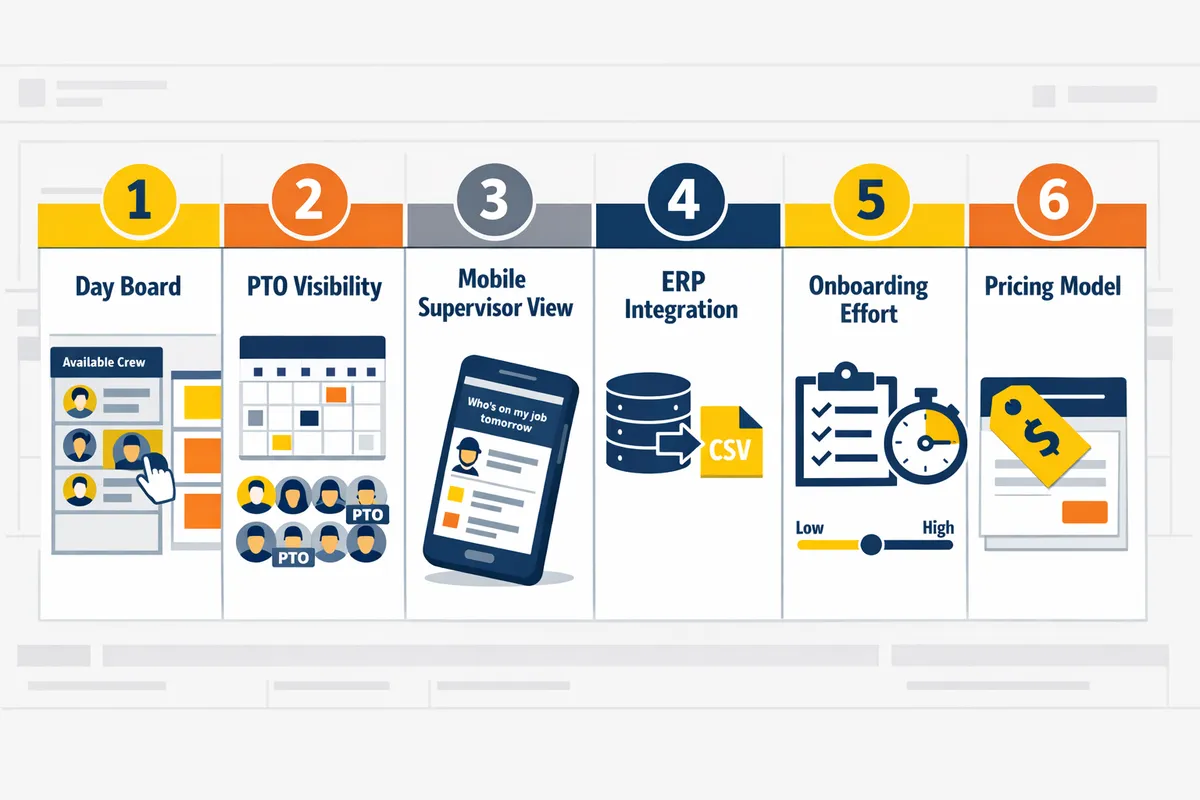
Score vendors on six practical criteria that match your daily scheduling loop: scheduling flexibility, time-keeping accuracy, mobile usability, payroll/ERP integration, implementation effort, and total cost of ownership. Use a weighted 1–5 rubric that prioritizes scheduling flexibility and reliable SMS delivery for trades. Compare vendors with a two-week proof-of-concept and a scoring sheet to produce a shortlist of three.
Scheduling flexibility (day-board vs calendar) 🎯
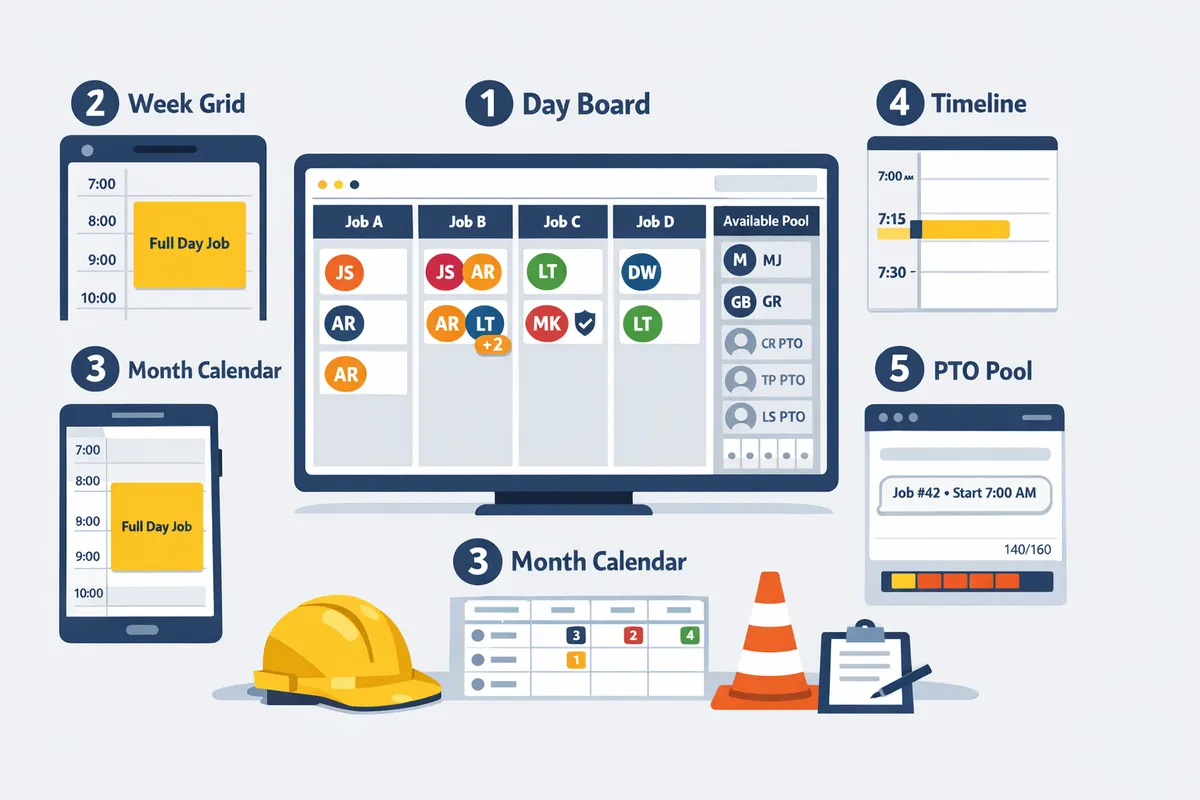
Prefer a day-board when jobs are full-day and only the start time matters. A day-board shows jobs as side-by-side cards so operators can bulk-assign crews, drag names between jobs, and copy a board between dates. For coatings and HVAC crews that rotate sites daily, test whether the app displays an "ideal crew size" but still allows overstaffing and whether it enforces single-use rules to block same-day double-booking. CrewSheet uses a drag-and-drop day-board, shows ideal crew size without forcing it, and prevents double-booking while letting you overstaff when needed. Practical test: try assigning a foreman and three techs to two adjacent jobs in under 60 seconds and note whether the UI blocks accidental duplicates.
Time-keeping and assignment accuracy ⏱️
Choose tools that enforce single-use and surface PTO at scheduling time to prevent accidental assignments. Verify the product's single-use rule and confirm PTO entries appear in the available pool so schedulers cannot drag blocked names onto a job. Ask vendors to walk through real UI examples that prevent spreadsheet copy-paste errors, such as blocked assignments, grayed-out PTO entries, and visible start-time overrides. CrewSheet shows PTO in the pool and blocks same-day duplicates, which reduces common operator mistakes from manual templates. Example test: import a crew CSV with three PTO rows, then try to assign those people; a correct app will prevent the assignment and log the conflict.
⚠️ Warning: Scheduling a worker on PTO is a frequent source of emergency overtime and missed starts. Always test PTO visibility during vendor trials.
Mobile usability for decision-makers 📱
Pick systems that let supervisors see "who's on my job tomorrow" on a phone without forcing every worker to log in. Field leadership needs a filtered, mobile-friendly view that answers a single question quickly; they do not need full desktop screens. During demos, have a foreman open the app on a phone, filter to their job, and confirm the assigned roster in under 30 seconds. CrewSheet follows a no-login, push-notify model where supervisors can pull a lightweight roster view and operators build the board on desktop. Practical check: run the mobile flow while driving between sites to see whether the interface requires extra clicks or a login for each crew member.
Integration with payroll and ERP systems 🔗
Match the app's import and integration pattern to where your jobs originate to avoid re-entry work. If jobs come from Foundations, Sage, or Acumatica, confirm whether the vendor supports a live integration or whether CSV import will be the ongoing bridge. Wrong integration choices create extra reconciliation time and payroll headaches. CrewSheet accepts CSV imports today and documents field mappings like job number, default_start_time, and ideal_crew_size; ask vendors for sample CSVs and a demo of mapping failures and fixes. Checklist items: ask about job ID preservation, frequency of imports, and how PTO syncs back to payroll.
Implementation effort and change management ⚙️
Score vendors on realistic onboarding time, CSV import reliability, and template setup effort when comparing implementation cost. A DIY spreadsheet-to-SMS switch can look cheap but often produces hours of weekly fixes and manual reconciliation. Include an onboarding checklist in your RFP that covers CSV column auto-detection, template creation, user permission setup, and one-week shadowing for the scheduler. CrewSheet's CSV auto-detection and pre-formed message templates shorten setup; run a two-week proof-of-concept with a single scheduler and one foreman to validate the change-management assumptions. Use the downloadable scoring sheet during vendor trials to capture onboarding hours and expected weekly admin savings. See our guide on Crew Scheduling Software for Construction Trades for an RFP checklist and setup examples.
Total cost of ownership and pricing model 💲
Compare flat-company plans versus per-user or per-message pricing and confirm whether SMS fees and A2P registration are included. Flat pricing simplifies budgeting for growing crews; per-message or per-user models often surface as hidden fees during high-volume weeks. Ask vendors about 10DLC A2P compliance, who handles campaign registration, and whether SMS segments or carrier fees apply during busy dispatches. CrewSheet offers a flat-company plan that includes unlimited SMS and built-in 10DLC A2P compliance, which removes per-message surprise charges for small trades teams. When evaluating costs, run a 30-day projection: multiply your average daily messages by peak-week send volume and compare that to the vendor's billing model.
💡 Tip: Ask vendors to run a sample 30-day SMS cost projection using your peak-week send counts and phone number list to reveal hidden fees.
How to score vendors quickly (6-step rubric)
Score each vendor 1–5 on the six criteria above and weight scheduling flexibility and SMS delivery highest for trades. 1) Create a spreadsheet with the six criteria and a 1–5 scoring column. 2) Run two-week proof-of-concepts with your real CSV exports and one live day-board. 3) Test PTO, single-use blocking, and a mobile supervisor view. 4) Validate CSV import mapping and a sample payroll reconciliation. 5) Measure onboarding hours and projected weekly admin time saved. 6) Sum weighted scores and shortlist the top three for a final contract negotiation. Use our downloadable scoring sheet in the Crew Scheduling Software for Construction Trades guide to standardize RFP responses and compare vendors side-by-side.
Which crew scheduling apps should you consider in 2026 — ranked shortlist?
This ranked shortlist recommends six crew scheduling apps and approaches ranked by trade fit, core features, and expected implementation effort. Use it to match a solution to your crew size, whether you need no-login SMS dispatch, and how much onboarding your team can absorb.
CrewSheet — Best for small trades that need no-logins and fast SMS sends 📲
CrewSheet is best for small-to-midsize trades that want a drag-and-drop day board and push-based SMS without field-worker logins. The tool lets an operator build a day's board, pick a pre-formed template, and send job start-time texts to crew numbers in about 30 seconds. It prevents same-day double-booking with single-use enforcement and makes PTO visible in the available pool so schedulers stop texting people on leave. For teams tired of Google Sheets plus group texts, CrewSheet replaces fragile templates with a repeatable, audit-logged send flow. See our Built for the field features page and the scheduling demo to view the day-board and message template workflow.
Assignar — Best for enterprise GCs that need full field-management 🏗️
Assignar suits enterprise general contractors that need broad project and workforce management across many sites. It includes robust project controls, compliance tracking, and per-user logins that support large, role-driven orgs. For a small coatings or HVAC trade, Assignar often forces platform-wide adoption, rigid role and crew-size rules, and weeks of configuration, which increases admin overhead and reduces daily flexibility. CrewSheet acts as a middle option for trades that want scheduling speed without enterprise rollout effort.
Google Sheets + SMS (manual) — Best low-cost, high-effort option 📝
Google Sheets plus group SMS is the cheapest short-term approach but creates the highest ongoing manual burden and error risk. Operators spend additional hours each morning copying rows, pasting phone numbers, and re-sending corrected messages after PTO mistakes or double-bookings. That extra admin costs billable hours and raises the chance of missed starts and overtime. Trialing CrewSheet against your spreadsheet workflow typically shows reduced build-and-send time and fewer reconciliation tasks; see our crew scheduling software overview for how the day-board replaces fragile spreadsheets.
Connecteam — Best for teams that need mobile-first time tracking and HR features 📋
Connecteam fits teams that want a combined mobile time-keeping, HR, and basic scheduling app. Its strength is mobile time tracking and workforce admin bundled with scheduling. Small trades should confirm whether Connecteam's scheduling UX supports a day-board view and whether requiring crew to use a mobile app matches field behavior. If you need fast, no-login SMS dispatch and a day-based board, CrewSheet reduces daily admin compared with a full HR-first product.
Buddy Punch — Best for straightforward time tracking with simple scheduling ⏺️
Buddy Punch focuses on accurate clock-in/clock-out and light scheduling for payroll-first shops. It fits contractors prioritizing time and attendance over complex dispatch workflows. Small crews that need SMS dispatch, visible PTO during assignment, and drag-and-drop day boards should confirm Buddy Punch supports those specific flows; otherwise they trade less scheduling friction for stronger payroll records. CrewSheet emphasizes quick dispatch and PTO visibility rather than deep payroll features.
ProCrew Schedule and niche schedulers — Best for operators who need specialized crew views 🧩
Smaller or niche schedulers fit operators with unique crew views or industry-specific reporting needs. Their advantages include specialized roster layouts and sometimes lower price points. Evaluate them on three practical items: whether they show PTO in the available pool, how reliable CSV imports are, and whether they force a crew login for daily dispatch. If any of those are missing, expect extra daily work: manual PTO checks, CSV repair, or continuing to send group texts. CrewSheet targets that gap by emphasizing CSV import reliability, PTO-aware pools, and no-login SMS.
| Option | Day-board UI | Drag-and-drop assignment | PTO-aware pool | No-login SMS dispatch | Message templates | Typical implementation time | Pricing model |
|---|---|---|---|---|---|---|---|
| CrewSheet | Yes | Yes | Yes | Yes | Yes (built-in) | Same-day to 1 week | Flat monthly plan |
| Assignar | Partial (module) | Yes | Yes | No (requires user accounts) | Yes | 4–12 weeks | Per-user / enterprise |
| Google Sheets + SMS | No | Manual | No | Yes (manual) | Manual (copy/paste) | Same-day | Free / ad hoc SMS costs |
| Connecteam | Partial (mobile-first) | Partial | Partial | App-based (not push-SMS) | Yes | 1–4 weeks | Per-user tiers |
| Buddy Punch | No (calendar-style) | Limited | Limited | App-based / email | Limited | 1–2 weeks | Per-user / team tiers |
| ProCrew / niche | Varies | Often yes | Varies | Varies | Varies | 1–4 weeks | Varies (subscription or per-location) |
CrewSheet and Assignar both reduce double-booking and admin time, with CrewSheet offering the fastest day-to-day admin reduction for small trades. CrewSheet's single-use rule and PTO-aware pool prevent same-day clashes faster than a manual spreadsheet, while Assignar reduces admin at scale but requires heavier rollout.
How to run a two-week trial with each shortlisted app 🧪
Run a two-week trial by importing identical CSVs, simulating schedule churn, sending live SMS, and logging time-to-build, errors, and operator confidence. Follow these numbered steps for consistent results:
- Export one week of jobs and your crew roster to CSV from your ERP or Google Sheet. Include PTO flags.
- Import the same CSV into each app and confirm column mapping.
- Build the day board for Day 1 and record time to complete the board (start timer).
- Simulate three common changes: swap a foreman, move a crew between jobs, and mark an unexpected PTO; note errors and reconciliation time.
- Send schedule SMS to a consenting, small test distribution list and record send time and any delivery issues.
- Repeat across seven business days to capture repeated workflows and edge cases.
- Log results in a checklist and score each app on build time, scheduling errors, and operator confidence.
💡 Tip: Use a consenting test group of internal numbers to avoid carrier flags and protect crew privacy during live tests.
Use our trial checklist in the Crew scheduling software for construction trades guide to track metrics consistently and compare outcomes across tools.
Which scheduling option will save you the most time and reduce double-booking?
A day-board that combines a PTO-aware crew pool and one-way SMS dispatch saves the most time and prevents same-day double-booking. CrewSheet uses that exact pattern so operators can assign crew, block PTO, and notify workers without requiring field logins.
Quick ROI calculator: estimate weekly hours saved 🧮
Use a four-step calculator to quantify weekly time savings and annualize them. 1) Record current daily scheduling time. 2) Estimate weekly error-fix hours from double-bookings and missed starts. 3) Apply expected time reduction from a day-board workflow. 4) Multiply weekly savings by 52 to get annual hours.
Sample walk-through (plug in your numbers). 1) Current daily scheduling: 20 minutes/day. 2) Days per week: 5. Current weekly scheduling = 20 × 5 = 100 minutes (1.67 hours). 3) Error-fix hours: 2 hours/week from missed starts and edits. Total current weekly load = 3.67 hours. 4) Expected reduction: a day-board + PTO-aware pool typically cuts manual scheduling by 60% and removes most error-fix time. Conservative saved hours = 3.67 × 0.6 = 2.2 hours/week. Annualized saved hours = 2.2 × 52 = 114.4 hours/year. If your fully loaded scheduler cost is $35/hour, that equals $3,994/year. Use this worksheet to substitute your daily minutes, error hours, and hourly labor cost.
Implementation checklist for trades 🧰
Use this five-step onboarding checklist to reduce rollout friction and catch CSV mapping errors early. 1) Import jobs and crew via CSV and confirm column mapping (job number, address, start time, ideal crew size). CrewSheet supports smart column auto-detection to speed this step; see Built for the field for details. 2) Add PTO entries for the rollout month so the pool shows unavailable crew. 3) Create 2–3 message templates (job start, delay notice, site instructions) and test character counts for SMS. 4) Run a pilot week with roughly 10% of crew or one foreman team to stress CSV mappings and message wording. 5) Collect feedback, fix mapping or messaging issues, then roll to full crew.
💡 Tip: Start the pilot with jobs that have clear addresses and a single start time to avoid mapping confusion.
Business costs of DIY spreadsheets and group texts 💸
Manual spreadsheet workflows and group texts impose recurring costs through wasted hours, overtime, and compliance exposure. Below is a compact cost matrix you can use in the ROI worksheet.
| Cost type | Typical weekly hours lost (small crew) | Business impact |
|---|---|---|
| Copy-paste and reformatting | 1–3 hours | Repeated admin time, delayed dispatch |
| Error correction (double-booking) | 1–4 hours | Overtime, lost billable days (e.g., a 12-person crew can lose 2 crew-days on one double-booked day) |
| Inconsistent messaging / compliance risk | 0.5–2 hours | Client disputes, safety miscommunications |
Include these costs in the ROI calculator to compare against vendor pricing and monthly subscription fees. CrewSheet reduces these line items with single-use enforcement, a visible PTO pool, and managed SMS templates so you avoid the repeated rework that spreadsheets cause. For broader context on switching from spreadsheets, see our crew scheduling guide for construction trades.
Recommendation: when to choose CrewSheet vs an enterprise platform ✅
Choose CrewSheet when you need fast, no-login SMS dispatch, PTO-aware scheduling, and a flexible day-board without committing to full ERP adoption. CrewSheet fits small-to-midsize trades operators who run rotating jobs, want to assign crew quickly, and prefer push-based SMS instead of forcing field-worker logins.
Pick an enterprise platform if you require deep project accounting, certified payroll reporting, or mandatory worker timecards tied to a single ERP. Those platforms justify their complexity when certified payroll, embedded job costing, or strict audit trails are mandatory for compliance or billing.
Pricing note: CrewSheet's public plan starts at $299/month, a flat company plan with unlimited users and unlimited SMS. Use the implementation checklist and ROI calculator above to test whether the subscription pays for itself within a year based on saved scheduler hours and reduced overtime. For feature comparisons, see our Scheduling Software for Construction Crews and Built for the field pages.
Frequently Asked Questions
This FAQ answers common buyer and operator questions about crew scheduling apps, SMS dispatch, PTO handling, and implementation for construction trades. Use these practical answers to validate features during trials and to compare how tools like CrewSheet handle the day-to-day scheduling loop.
Can I assign crews by text without making field workers create accounts? 📱
Yes. CrewSheet and SMS-first crew scheduling apps send one-way schedule messages by text so field workers do not need to create accounts or install an app. This reduces adoption friction and removes the need to force logins on crew, which is a common blocker with enterprise platforms. Operators keep a single day-board as the system of record and push job details (job number, address, start time) directly to phone numbers. For background on the no-login pattern and when it fits your crew size, see our no-login crew scheduling solution article.
How does a PTO-aware scheduling app prevent double-booking? 🛌
A PTO-aware scheduling app prevents double-booking by marking unavailable crew in the pool and blocking assignments for those dates. In practice you should test PTO visibility during a trial: add a PTO entry for a crew member, open the day-board, then attempt to assign them to a job for that date; the UI should gray the name and deny the assignment. PTO features to check in trials: visible calendar entries in the pool, clear labels (sick, vacation), and copy-protecting rules when you use CSV imports. See our feature comparison on the field-focused day-board for details.
Is SMS crew scheduling compliant with carrier rules? ✅
SMS dispatch at scale requires 10DLC A2P registration, campaign vetting, and correct sender identification to avoid carrier rejections. CrewSheet includes 10DLC compliance as part of the product so operators do not need to manage brand registration and campaign approval themselves. Noncompliant sends can be throttled or blocked, and carriers may return unexpected error codes that look like delivery failures.
⚠️ Warning: Sending high-volume SMS without 10DLC registration can lead to blocked messages and delayed deliveries. Use a tool that handles carrier vetting for you.
Can I keep using spreadsheets while adding a scheduling app? 📂
Yes. CSV import is the typical migration path so teams can run spreadsheets and the scheduling app in parallel during a short pilot. A practical migration sequence is: export jobs and crew from your ERP or Google Sheet, import into the scheduling app (verify column mapping), run the board in parallel for one week, and only switch to the app when roster and PTO visibility match your rules. CrewSheet’s CSV import auto-detects common columns like name, phone, and default_start_time to speed the process. For a beginner’s checklist on moving off spreadsheets, see our crew scheduling guide for construction trades.
💡 Tip: Run a one-week parallel pilot and validate PTO visibility and message templates before fully switching. This avoids morning confusion and preserves billing continuity.
How fast can I send the daily schedule to my crew? ⏱️
With a day-board and pre-built message templates, operators can assemble and send a small-crew daily schedule in roughly the time of a quick phone call. Actual time-to-send depends on import quality, whether templates are ready, and how many last-minute edits supervisors request. To speed morning sends, prepare templates for common job types, keep a clean crew pool with phone numbers, and use the copy-schedule or bulk-assign controls during busy weeks. CrewSheet’s day-board and templates are designed specifically to minimize the manual copy-paste work operators currently do in group texts.
Do field workers need to reply to confirm their schedule? 📥
No. The one-way SMS model expects crew to follow instructions without confirming, which cuts down on chasing replies during a busy morning. Operators should rely on outbound notifications and handle exceptions with targeted supervisor calls or a follow-up announcement. CrewSheet records delivery status for operational troubleshooting but does not present reply-based confirmation or rely on read receipts as a primary workflow.
Internal resources: learn more about day-board scheduling in our Crew Scheduling Software for Construction Trades guide and review specific field features on the Built for the field page.
Next step: pick the tool that stops morning firefights
Pick a tool that reduces admin hours and prevents double-booking. Among crew scheduling apps, small-to-midsize trades should prioritize solutions built for day-board scheduling and push-based SMS so field workers never need a login. See our guide on Crew Scheduling Software for Construction Trades for a side-by-side comparison and shortlisting checklist.
Top pick: Crew Sheet. Start here if you want to move off fragile spreadsheets and group texts and cut the time spent sending schedules each morning. As a quick fallback, a disciplined spreadsheet plus a dedicated SMS routine will work short-term but keeps the same risks you just read about.
Contact Crew Sheet to discuss your crew size and operations and arrange a walkthrough specific to your trades workflow. For more on keeping field crew off a login roll while still sending reliable start-time texts, see our post on the No-Login Crew Scheduling Solution for Construction Field.