Crew scheduling software for trades that move jobsites every day.
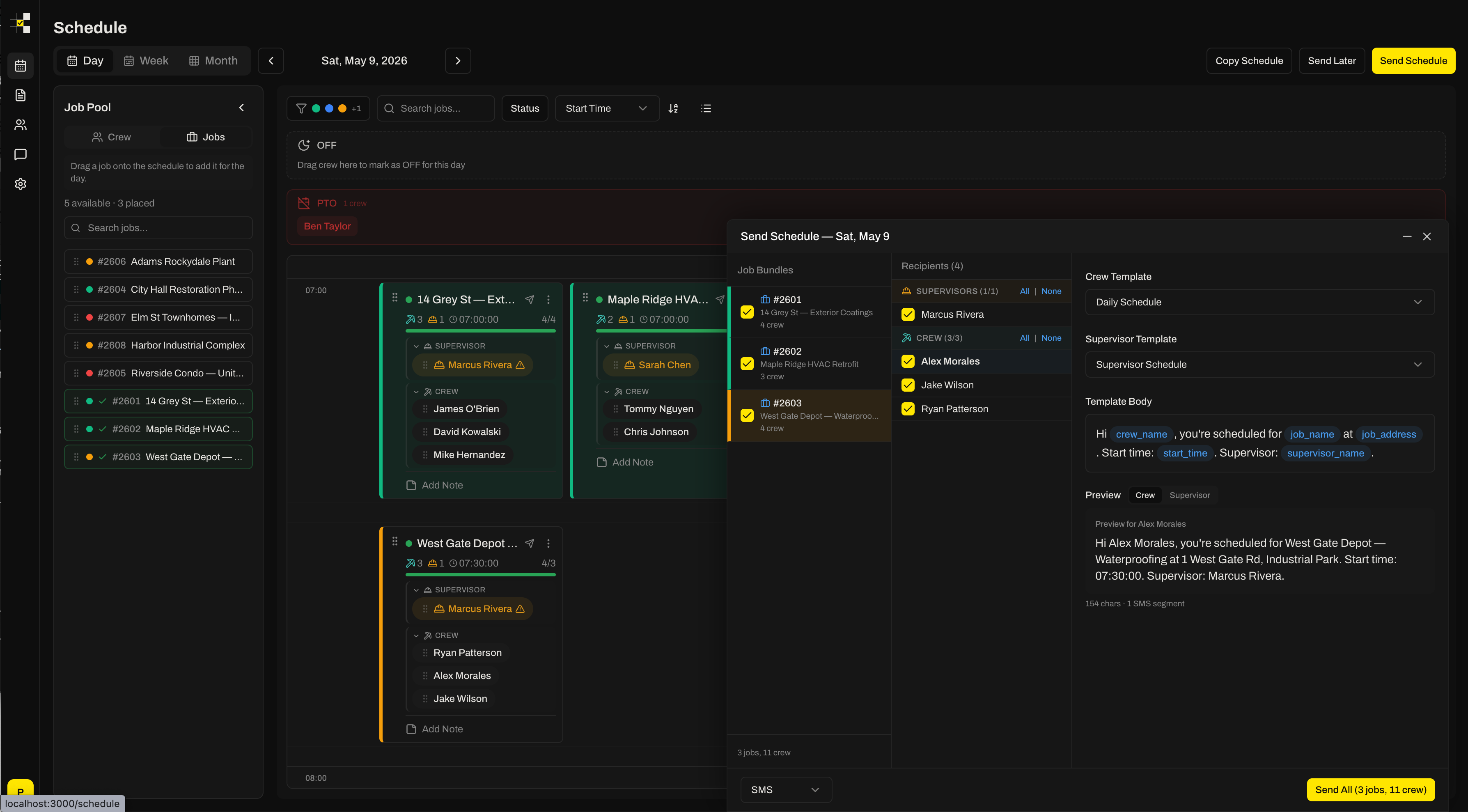
Build tomorrow’s board by dragging names onto jobs. See PTO before you double-book. Hit send and every crew member gets a text with their jobsite and start time. No app to install, no logins for the field.
Built for the gap between a spreadsheet and a platform.
- You run 10 to 150 field workers across several active jobsites at once.
- Crews are dispatched as crews, and the jobsite changes week to week or day to day.
- Someone in the office relays field leadership’s decisions into a sheet and a group text every afternoon.
- Jobs already live in Foundation, Sage, Acumatica or another ERP and you have no intention of moving them.
- You want the crew told, not asked. No confirmations, no read receipts.
- You dispatch single technicians to hourly service calls. That is a field-service product, not a crew board.
- You need timesheets, safety forms, equipment tracking and scheduling in one system, and will actually use all of it.
- You want workers to accept or decline shifts from an app.
- You schedule by the hour rather than by the day.
Drag names. Hit send. Crew gets the text.
Day board, jobs side by side
Each job is a column with its number, name, address, start time and ideal crew size. Drag names from the pool onto a job or straight between jobs. Overstaff when the work needs it.
PTO visible before you double-book
Crew on approved time off are grayed out and labeled in the pool for that day. Requested-but-unapproved time off shows a warning instead of blocking you.
Text the whole crew in 30 seconds
Pick the date, pick a template, hit send. Every assigned worker gets an SMS with their jobsite and start time. Character and segment counter so you know what they'll see.
Templates that don't break
Pre-formed messages with variables for job, address, start time and notes. Edit them in a form, not a spreadsheet cell someone will overwrite.
Foreman view for tomorrow
Supervisors see only who is on their job the next day. Foremen are dragged like any other crew member, not permanently tied to a job.
Audit trail of every message
Who was told what, when, on which channel, and whether it was delivered. Useful the morning someone says they never got the text.
Spreadsheet + texts, full platform, or CrewSheet.
Most trades contractors we talk to have looked at both ends of this table and stayed on the spreadsheet. The middle column is what they were looking for.
- SPREADSHEET
- Already running
- PLATFORM
- Weeks to months
- CREWSHEET
- An afternoon (CSV import)
- SPREADSHEET
- No
- PLATFORM
- Yes, every one
- CREWSHEET
- No
- SPREADSHEET
- Separate tab, if anyone checks
- PLATFORM
- Yes
- CREWSHEET
- Yes, in the pool
- SPREADSHEET
- No
- PLATFORM
- Yes
- CREWSHEET
- Yes (per day)
- SPREADSHEET
- Copy-paste scripts
- PLATFORM
- Yes
- CREWSHEET
- Yes, with variables
- SPREADSHEET
- Your phone's sent folder
- PLATFORM
- Usually
- CREWSHEET
- Yes
- SPREADSHEET
- Yes
- PLATFORM
- Often blocked by role rules
- CREWSHEET
- Yes
- SPREADSHEET
- Free plus SMS tool
- PLATFORM
- Per seat, enterprise contract
- CREWSHEET
- Flat monthly, unlimited users
| SPREADSHEET + SMS | FULL PLATFORM | CREWSHEET | |
|---|---|---|---|
| Setup time | Already running | Weeks to months | An afternoon (CSV import) |
| Field workers need logins | No | Yes, every one | No |
| PTO shown while scheduling | Separate tab, if anyone checks | Yes | Yes, in the pool |
| Double-booking blocked | No | Yes | Yes (per day) |
| Message templates | Copy-paste scripts | Yes | Yes, with variables |
| Delivery log per message | Your phone's sent folder | Usually | Yes |
| Overstaff a job when needed | Yes | Often blocked by role rules | Yes |
| Pricing model | Free plus SMS tool | Per seat, enterprise contract | Flat monthly, unlimited users |
Jobs come from accounting. They should stay there.
CrewSheet pulls jobs and crew in; it is not where jobs are created. Today that is a CSV export from your ERP with automatic column detection for job number, name, address, start time and crew size. It takes minutes, and it works with any system that can export a spreadsheet.
Direct integrations with Foundation, Sage and Acumatica are on the roadmap. Design partners choose which ships first. See the integrations page for the current list.
Questions schedulers ask first.
What is construction crew scheduling software?+
Software that lets a scheduler assign field workers to jobsites for a given day and tell them where to be. For trades contractors that means a per-day board of jobs, a pool of available crew, drag-and-drop assignment, and a way to send everyone their job and start time by text. CrewSheet does exactly that and stops there: it is not a full ERP, timekeeping, or project-management platform.
Do my field workers need to download an app or log in?+
No. Crew receive their schedule as a normal SMS to the phone number on file. Only office staff (schedulers, admins, supervisors) have accounts. That removes the biggest adoption problem with full platforms, where every worker needs a login and the ones who don't set it up become the excuse.
How is this different from a spreadsheet plus group texts?+
The spreadsheet stays the mental model: jobs across the top, names underneath. What changes is that PTO shows up on the board, one person can't be put on two jobs the same day, message templates don't break when someone edits a cell, and every text sent is logged with delivery status so you can prove who was told what.
How is it different from Assignar or other full workforce platforms?+
Those platforms cover scheduling, compliance, timesheets, forms, and asset tracking, and price and implement accordingly. CrewSheet covers the scheduling-and-notification loop only, works with the ERP you already have, and imports from CSV in an afternoon. If you need a full operations platform and will use most of it, buy one. If you need to build tomorrow's board and text the crew, this is faster and cheaper.
Which construction trades is CrewSheet built for?+
Trades whose crews move between jobsites and are dispatched as crews rather than as individual technicians: coatings and flooring, HVAC and mechanical installation, roofing, concrete, electrical and specialty subcontractors. It is a poor fit for single-tech service dispatch with hourly appointment windows.
Can it pull jobs from my accounting or ERP system?+
Today jobs and crew come in via CSV import with automatic column detection, which takes minutes from any system that can export a spreadsheet. Direct integrations with Foundation, Sage, and Acumatica are on the roadmap. Design partners get a say in which ships first.
How much does it cost?+
One flat plan at $299 per company per month with unlimited users and unlimited SMS, including 10DLC A2P registration. Annual and multi-year billing discounts are listed on the pricing section of the home page. Design partners who help shape the product get free access.