L1 L2 L3 Schedules in Construction: From CPM to Day Board

L1 L2 L3 Schedules in Construction: From CPM to Day Board
A foreman juggling three overlapping project plans can lose two hours every morning reconciling who should be on which job. L1 L2 L3 schedules in construction is a scheduling hierarchy that maps CPM-level milestones (L1) through project-phase plans (L2) down to day-by-day crew assignments (L3). When that hierarchy is not mapped to the day board, double-bookings, missed starts, and PTO mistakes follow. This practical best-practices guide, based on operator experience, shows how to map those layers into daily crew assignments and the governance, templates, and KPIs to keep the day board accurate. Our CrewSheet construction crew scheduling software replaces spreadsheets and group texts with a PTO-aware drag-and-drop board and one-way SMS. A short daily checklist in this guide shows what prevents the morning scramble.
How do L1, L2, and L3 schedules map to daily crew assignments?
L1, L2, and L3 map vertically: L1 fixes contract milestones, L2 builds a CPM that creates rolling lookaheads, and L3 breaks those lookaheads into crew-sized day cards that feed the day board. This mapping matters because disciplined handoffs are the only reliable way to keep daily assignments feasible, on-time, and free of double-booking. Knowing what are L1 L2 L3 schedules in construction lets operators reduce rework, prevent missed acceptances, and keep crews productive.
L1: The contract and milestone schedule 🗺️
L1 is the contract-level milestone register that fixes delivery dates, acceptance events, and long-lead procurement constraints that limit downstream scheduling. Project directors or program managers own L1 and must publish a small set of attributes (milestone date, float, acceptance window, procurement lead time). Typical L1 formats are a milestone list or summary bar chart used by commercial teams and the scheduler. Outputs that must flow down include contractual freeze dates, client acceptance windows, and procurement lead times for critical equipment.
- Owner: project director or program manager.
- Key outputs for schedulers: milestone date, acceptance deadline, linked procurement lead time.
💡 Tip: Record milestone dependencies (float, acceptance dates) as attributes so downstream schedulers can filter critical-path items quickly.
CrewSheet role. Export the milestone register into your planning CSV or tagging field so the scheduler and operator see contract constraints on the schedule board. This prevents assigning a crew to work that would violate an acceptance milestone.
L2: The project CPM and project-level plan 🧭
L2 is the CPM-based project schedule that defines logic, durations, and the 2–8 week rolling lookahead used to prioritize L3 work. The project scheduler or lead planner owns L2 and must deliver constrained activities, resource buckets, and prioritized lookaheads on a weekly cadence. Typical L2 outputs are a CPM network, resource-loaded WBS summaries, and the explicit 2–8 week lookahead extract that becomes the source for L3.
Handoff steps from L2 to L3/day board:
- Scheduler publishes the 2–8 week rolling lookahead every Monday with constrained activities flagged.
- Export lookahead items to CSV or shared task register with WBS IDs and resource buckets.
- Planner maps lookahead work packages to L3 task templates with location, estimated crew size, and lead materials.
CrewSheet role. Import the L2 lookahead rows into CrewSheet as week-level jobs or tags so the operator can pull true priorities onto the day board without retyping. See how to use the schedule board for day planning in the schedule board guide.
L3: Short-term lookahead and workface plan 🛠️
L3 is the 1–4 week short-term lookahead that converts CPM activities into assignable, crew-sized tasks with start dates, locations, and resource needs. Foremen, site superintendents, and the planner jointly own L3; they must agree on sequence, crew size, contingencies, and special instructions before any day-level assignment occurs. Typical L3 formats are 1–4 week lookahead lists, daily task cards, and a WBS-linked task register that exports to the day board.
Critical day-board handoff (exact steps):
- Planner freezes the next 7–14 days of L3 activities each afternoon with WBS ID, location, start date, ideal crew size, and special instructions.
- Foreman reviews and confirms feasibility on site (materials, access, supervision).
- Operator imports or copies the confirmed L3 rows into the day board view and sets per-job start times.
- Operator assigns crew on the day board and sends SMS job cards to the roster.
- Foreman provides same-day feedback into the L3 register for the scheduler to adjust lookaheads.
- Owner: foreman + site superintendent + planner.
- Day-board outputs: per-day job cards, start time, ideal crew size, PPE or permit notes.
⚠️ Warning: If owners are unclear at L3, the day board devolves into guesswork and double-booking.
CrewSheet role. Use CrewSheet’s day board to build per-day job cards from L3 rows, drag crew from the pool, and send start-time SMS without requiring field-worker logins. The single-use rule and PTO visibility help stop overlaps that commonly occur when L3 ownership is weak. For operational questions about preventing double-booking and using templates, see Construction Crew Scheduling FAQs.
How to translate CPM outputs into daily crew schedules (step-by-step)
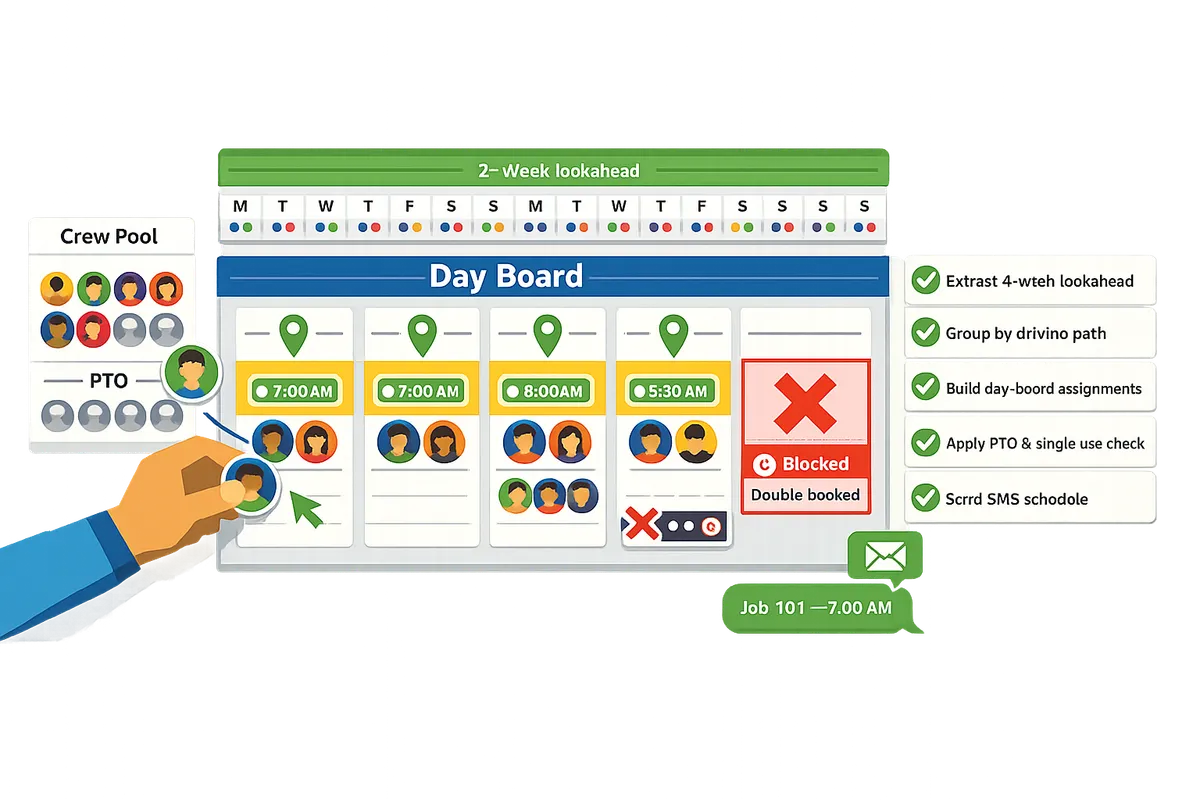
Use a five-step, owner-assigned workflow to convert CPM outputs into crew-sized day-board assignments. This workflow extracts a 4-week lookahead from L2, turns driving-path activities into L3 task cards, matches those cards to the PTO-aware crew pool, validates materials and permits, and sends daily SMS/email with an audit log. Follow the numbered steps below with the named owners and templates so the day board becomes a repeatable, low-risk handoff from planning to field.
Step 1: Extract the 4-week L2 lookahead 🗂️
Export a prioritized 4-week lookahead from the L2 CPM as the scheduler's starting deliverable. The project scheduler pulls the CPM export with milestone constraints and filters by driving-path, near-term floats, and handover dates. Output a CSV that flags critical activities, predecessor constraints, and contract milestones so the planner can sort by field-critical items. Example: on an infrastructure job the scheduler should tag utility tie-ins and traffic-shift milestones so planners see coordination risk before breaking tasks into day-size pieces. Save the CSV in CrewSheet-ready columns (job number, address, default start time, ideal crew size) to speed import to the day board and reduce rekeying errors. For how the day board accepts CSVs and handles drag-and-drop assignment, see the schedule board documentation.
Step 2: Break high-priority activities into L3 task cards 🧾
Convert each prioritized L2 activity into an L3 task card with a clear start date, duration, and an ideal crew size owned by the planner and foreman. Use the work package scope as input and produce one-day job-card templates that include address, start time, safety notes, and contract flags. Example: civil crews should add traffic-control lead times and permit IDs to L3 cards; EPC planners should link subsystem turnovers and test windows to specific task cards. The planner and foreman should review every card together to set the practical crew size and identify onsite constraints. Store the L3 cards in a CSV import template so the operator can pull them into CrewSheet without manual re-entry.
Step 3: Match tasks to available resources and PTO calendar 🔎
Assign L3 task cards to crew members while checking PTO and skill tags so assignments are feasible and non-conflicting. The operator or scheduler uses the PTO-aware pool to see grayed-out unavailable crew, applies skill tags (foreman, certified operator, welder), and enforces the single-use rule so no worker ends up on two jobs the same day. Example: a coatings operator should never schedule a certified sprayer on a PTO day; marking the sprayer in the pool prevents accidental assignment. CrewSheet's drag-and-drop board speeds this match step and displays ideal crew sizes as guidance.
💡 Tip: Always check PTO and critical-skill tags during step 3 to avoid last-minute rework and field overtime.
Step 4: Validate critical-material and permit-feasibility before finalizing day assignments ✅
Confirm that critical materials, permits, and utility windows exist for each drafted day assignment before locking the board. The site superintendent reviews procurement flags, permit numbers, and utility coordination notes and marks each job green-lighted or flagged for hold. Example: on a civil road closure the superintendent must confirm traffic control setup and signed permits before the crew leaves the yard; if not green-lighted, move the card or split the crew to an alternative task. Use an approval threshold (who can move dates and by how many days) and log overrides in a lightweight change form to keep traceability between L2/L3 and the day board.
Step 5: Send assignments by SMS/email and log the send 📩
Send the finalized day-board notifications to crew by SMS or email and record the send in an audit log for traceability. The operator selects a message template, confirms recipients, and hits send; the system records recipients, job info, channel, and timestamp so the office can prove who got notified. Example: for a night-shift utility tie-in choose an 'early start' template and include the permit number in the SMS so the foreman has the reference on arrival. Save the audit log entry to the project folder for daily claim support and dispute resolution.
| Layer | Owner | Responsibility | Key inputs | Key outputs |
|---|---|---|---|---|
| L1 (Program milestones) | Program manager | Approve milestone shifts and major scope edits | Contract milestones, client directives | Approved milestone list, change approvals |
| L2 (CPM / lookahead) | Project scheduler | Maintain CPM, export 4-week lookahead | CPM file, contract constraints | Prioritized 4-week CSV lookahead |
| L3 (Task cards) | Planner + Foreman | Break lookahead into crew-sized cards | Work package scope, lookahead | L3 task cards (job-card CSV) |
| Day board | Operator / Scheduler | Assign crew, check PTO, send notifications | L3 cards, crew pool, PTO calendar | Final day board, audit log, crew notifications |
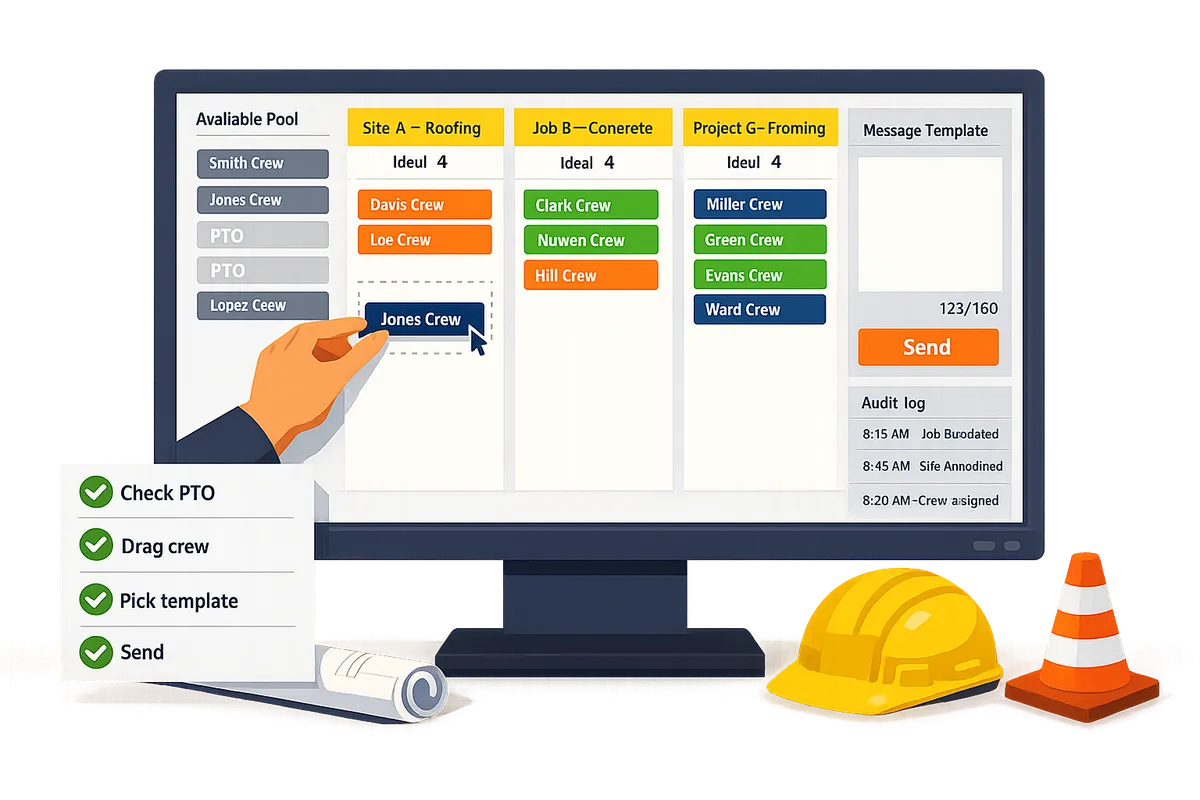
Quick-start operator checklist:
- Import latest L2 lookahead CSV into the board.
- Confirm permit/material flags for today’s jobs with the superintendent.
- Check PTO and unavailable crew in the pool.
- Drag crew to jobs; treat ideal crew size as advisory.
- Pick message template and send; save the audit log.
⚠️ Warning: Skipping the PTO check causes the most common double-booking error.
For additional setup and templates, see our guide to Crew Scheduling Software for Construction Trades and the schedule board overview. If you still have operational questions about single-use rules or SMS sending, consult Construction Crew Scheduling FAQs or the comparisons in Scheduling Software for Construction Crews.
How to measure and control schedule drift between L1–L3 and the day board
Measure drift with a short list of operational KPIs, a lightweight L2/L3 change-control process, and an auditable log that ties daily edits back to the baseline. These three elements let you spot creeping delays, assign accountability, and resolve disputes over who changed what and why. Below we list the KPIs to report, a step-by-step change-control flow, a practical vendor comparison, and common pitfalls with concrete mitigations.
KPIs to watch and how to report 📊
On-time start rate, lookahead hit rate, crew utilization, and change frequency quantify schedule health. Use these metrics as your operating dashboard: each one maps to a single owner, a reporting cadence, and a clear business consequence.
- On-time start rate. Definition: percent of jobs that begin within the agreed grace period (for example, within 15 minutes of the scheduled start). Owner: operator. Business consequence: missed starts multiply travel and idle costs; tracking daily exceptions exposes habitual causes.
- Lookahead hit rate. Definition: percent of L3 tasks that appear on the day board as planned. Owner: planner. Business consequence: a falling hit rate signals poor upstream predictability and triggers a review of L2 CPM logic.
- Crew utilization. Definition: percent of available crew assigned to billable work per day. Owner: operations manager. Business consequence: low utilization shows overstaffing or scheduling gaps that hit margins.
- Change frequency. Definition: count of L2/L3 edits per week and percent that touch critical-path activities. Owner: project controls.
Report cadence and format. Deliver a weekly executive summary that highlights trends and a daily exception list for the operator showing missed starts, reassignments, and PTO conflicts. Exportable CSVs speed reconciliation with payroll and jobcost systems. See our guide to the schedule board for how to capture day-board snapshots and exports.
Change control and baseline management 🔁
A lightweight change-control log that records who changed L2/L3 dates, the reason, and approval preserves baselines and auditability. The process should be short, paperless, and enforced for any edit that affects downstream day boards.
Use this four-step flow on edits that shift day-board outcomes:
- Submit change request. The requester records the reason, impacted activities, and a proposed new date.
- Quick impact assessment. Planner checks downstream day boards and flags affected crews and start times. Keep this assessment to one screen or CSV export to avoid analysis paralysis.
- Approve or escalate. Set an approval threshold: small-duration edits (under X hours) allow planner sign-off; critical-path edits require project-controls or ops manager approval.
- Update the audit log. Record the approver, timestamp, and a short rationale.
CrewSheet supports this flow with an exportable audit log and CSV import so operators can reconcile the day board against the baseline without a heavy ERP integration. That audit trail is the single source you use when payroll, client claims, or safety reviews require an evidence chain.
⚠️ Warning: If last-minute changes go unlogged, you lose your baseline and increase the risk of billing disputes and safety gaps.
Operational trade-offs: spreadsheets + SMS vs Assignar vs CrewSheet 🧾
The right operational compromise depends on setup speed, field logins, PTO visibility, and governance tolerance. The table below compares three common approaches across the operational attributes teams tell us matter most.
| Approach | Setup time | Field-worker login required | PTO visibility | Overstaffing allowed | One-way SMS | Time-to-send schedule | Governance overhead |
|---|---|---|---|---|---|---|---|
| Spreadsheet + group texts | Very low to start; high manual upkeep | No | Manual; often missing | Yes | Yes but untracked and noncompliant | Manual copy-paste; error-prone and slow for lists | Low setup, high ongoing reconciliation burden |
| Assignar (enterprise scheduler) | High; platform onboarding and training | Yes | Built-in | Often restricted by rigid crew-size rules | Notifications may require logins | Formal steps and approvals; slower to push changes | High: strong controls but inflexible |
| CrewSheet (day board + SMS) | Low to moderate; CSV import and day-board ready | No | Visible in the pool by default | Allowed; ideal crew size shown but not enforced | Built-in, template-based SMS with compliance features | Fast day-board send from a single view | Moderate: lightweight audit logs and exports make reconciliation practical |
Use this comparison to match your team. If you cannot force logins and need quick daily sends while keeping an audit trail, our CrewSheet day board is positioned as the middle path between fragile spreadsheets and heavyweight platforms. Read more about scheduling software options in our primer on crew-scheduling software for construction trades.
Common pitfalls and mitigation tactics 🛑
Unclear owners, missing PTO, and untracked last-minute changes cause most schedule drift. Assign single owners for each metric and process step, make PTO visible in the scheduling pool, and require a short change-log for any L2/L3 edits.
Mitigation checklist:
- Enforce a single-use rule for crew on the day board so operators stop double-booking. CrewSheet enforces single-use at assignment to prevent overlaps.
- Require PTO visibility on the board. Showing PTO in the pool prevents accidental scheduling and reduces last-minute reassignments.
- Keep a short, time-stamped change log for L2/L3 edits. Capture who, why, and downstream impact; the log is your evidence for cost recovery or client disputes.
- Use templated messages with live SMS counters when sending schedules. That reduces broken scripts and carrier problems when you announce changes.
Example scenario. If a foreman calls at 06:15 to move two crew members and the operator moves them without logging the change, you create a chain of lost hours, client confusion, and payroll mismatch. Requiring the operator to do a two-line change request and a one-line impact note prevents that loss and creates a clear audit trail.
For operational how-to and onboarding tips, see our Construction Crew Scheduling FAQs and the schedule board documentation to align daily practice with project-level CPM outputs.
Frequently Asked Questions
This FAQ gives direct, operational answers to the most common questions operators ask about mapping L1–L3 schedules into daily crew assignments. Each answer focuses on what to do, why it matters for field reliability, and a concrete example you can apply on the board.
What are L1, L2, and L3 schedules in construction? 🏗️
L1 is the contract-level milestone list, L2 is the CPM-based project plan, and L3 is the short-term, assignable lookahead that breaks L2 into crew-sized tasks. L1 fixes dates the owner or main contract cares about (milestones, handovers). L2 contains network logic, driving paths, and the rolling baseline used for resource loading and risk analysis. L3 slices L2 into 2–4 week work packages with start dates, location, and suggested crew size so the field can assign people. Example: an EPC project has L1 milestone 'Mechanical Completion', L2 shows the commissioning path, and L3 lists week-by-week installation packs assigned to the site foremen.
How do I translate CPM outputs to a daily crew schedule? 🔁
Extract a 2–4 week lookahead from the L2 CPM, convert critical-path activities into L3 task cards with start dates and crew-size guidance, then load those cards onto the day board and assign crews. Follow a four-step routine:
- Export L2 activities for the next 2–4 weeks and filter to driving-path items.
- Turn each activity into an L3 task card with location, required skill, ideal crew size, and start date.
- Match cards to available crews, check PTO and single-use constraints, and place people on the day board.
- Send the day’s roster via SMS templates and log the send.
Example: a coatings subcontractor pulls week-3 prep items from the CPM, creates three L3 cards for three zones, assigns two foremen and six technicians on the board, then hits send. Use the schedule board to drag names and avoid re-keying; see how the schedule board works in our guide to The schedule board and the CrewSheet getting-started overview.
Can I keep using my ERP and still use a day board? 🗄️
Yes. Export jobs and crew from your ERP as CSV and import them into the day board so your ERP remains the system of record. Map the important columns (job number, address, start time, ideal crew size, crew phone) during import and include PTO as a column so availability appears on the board. This avoids duplicate entry and reduces payroll reconciliation errors. Example: export the week’s job list from Sage or Foundations, import into CrewSheet, then build the day board without losing your ERP job IDs; see our guide on Crew Scheduling Software for Construction Trades for common import patterns.
How do I prevent double-booking and respect PTO? 🚫
Prevent double-booking by showing PTO in the crew pool, enforcing a single-use-per-day rule, and validating assignments before sending notifications. Make PTO part of the crew import so names appear grayed out and labeled on the selected date. Enforce the single-use rule on the board so a crew member cannot be assigned to two jobs the same day; allow an override only with an explicit confirmation and audit note.
💡 Tip: Add recurring time-off (weekly days off) to crew profiles before importing to block those dates automatically and stop last-minute rework.
Example: when a foreman is marked PTO in the CSV, CrewSheet shows them unavailable and the board prevents a drag-and-drop assignment for that date. For more operational Q&A on PTO and sends, see Construction Crew Scheduling FAQs.
Which KPIs matter most for L1–L3 alignment? 📊
Track on-time starts, lookahead hit rate, crew utilization, and change frequency to pinpoint where planning breaks down between levels. Define each measure before you report it: on-time starts as percentage of L3 tasks that begin on their scheduled date; lookahead hit rate as percent of activities in the 2–4 week plan that move into execution without rework; crew utilization as assigned-days divided by available-days; change frequency as approved baseline edits per month. Use these KPIs to choose corrective action: high change frequency with low lookahead hit rate means planning quality issues; low crew utilization with high on-time starts indicates overstaffing. CrewSheet’s dashboard and audit logs help surface these metrics and trace who made schedule edits.
Is one-way SMS enough for crew dispatch? 📱
One-way SMS is sufficient for most specialty trades because it reduces friction for field workers and ensures messages reach crew without requiring app installs or replies. Use short, consistent templates and include start time, job address, and any critical PPE or entry notes. Keep an audit log of sends to prove who received the schedule and when; this reduces morning calls and last-minute confusion. Exception: high-risk or highly regulated work may need confirmations or two-way workflows; in those cases keep SMS as the primary push and manage confirmations separately by phone or project control tools. See our primer on how CrewSheet replaces spreadsheet-plus-SMS workflows in Scheduling Software for Construction Crews.
Turn CPM and project plans into daily crew rosters with clear governance and a day board.
The core takeaway is that L1 L2 L3 schedules in construction become operational only when you map each layer to a single-day assignment, enforce a single-use rule, and measure a few simple KPIs. Evidence from field ops shows that assigning start times, visibility to PTO, and a short template for crew messages prevents most last-minute calls and travel waste.
Start with the highest-impact practice: build a Day view and use one template for start-time SMS. For a practical how-to, follow the schedule board guide to import jobs and crews and trial the board on one week. See our beginner primer on crew scheduling for broader context.
💡 Tip: Run a one-week pilot with one foreman and a single job per crew to calibrate ideal crew sizes and your daily KPIs.
Download the CrewSheet day-board CSV template and import it using the schedule board guide to run your first day board test. For more operational answers, check the construction crew scheduling FAQs.