Announcements
An announcement is a one-off message to part or all of your workforce — a weather delay, a last-minute change, or a general heads-up — sent outside the normal schedule notification.
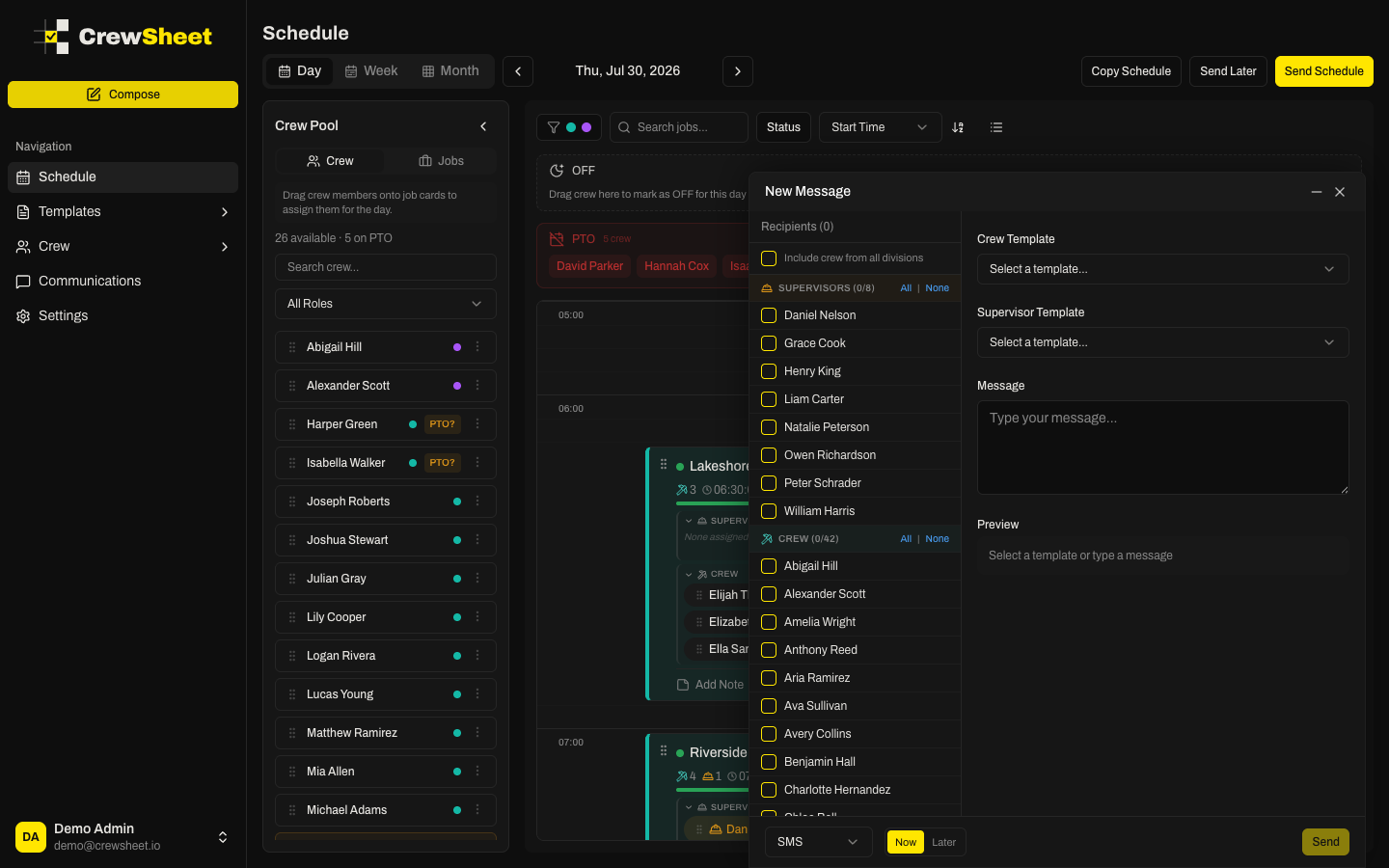
Send an announcement
- Open the composer with New Message (it isn't tied to a job).
- Pick your recipients from the crew list. Members are grouped into Supervisors and Crew, each with All / None shortcuts.
- Either choose a saved template or type a message directly in the message box.
- Preview the text, check the SMS character and segment count, then click Send.
Choosing recipients
By default the list shows crew in your currently selected division. Admins see an Include crew from all divisions checkbox to reach the whole organization in one message.
Watch for job-specific templates
Announcements have no job attached, so any template that relies on job details — job name, address, start time, supervisor, or crew list — can't fill those in and will leave them blank. CrewSheet flags these templates with a warning triangle. For a message about a specific job, send it from that job card instead (see Sending the schedule).
Schedule it for later
Announcements can go out immediately or at a set time — switch to Later and pick a send time. See Scheduled sends. Every announcement is logged in Communication history under an Announcement label.